Monday.com Notifications,
Delivered to the Right Person
Other integrations send to channels and chats. MS Teams Direct+ sends DMs to the person assigned to the task. The actual person who needs to act.
Five-minute install. Works with your existing automations. If your team doesn't report fewer missed notifications within 14 days, full refund.
Intelligent routing to individual users
When a task is assigned in Monday.com, MS Teams Direct+ automatically notifies that specific user in Teams. No chat IDs, no manual configuration, no workarounds.
Route to assigned users
Send to whoever is assigned to the task in Monday.com. Automatically creates the 1:1 chat if needed.
Automatic user mapping
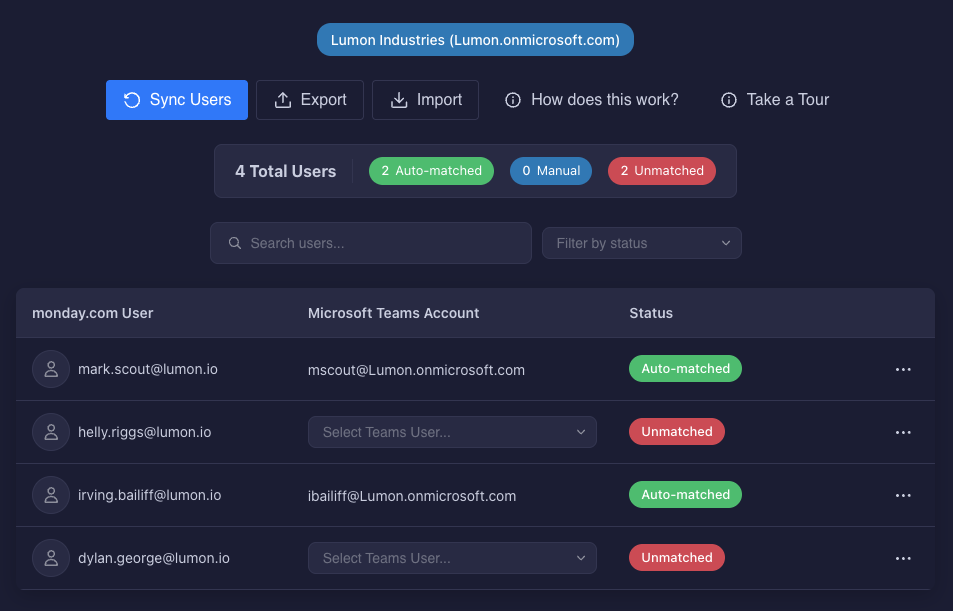
Matches Monday.com users to Teams users by email. Import hundreds via CSV or let it match automatically.
Full task context
Every notification includes board name, group, item details, and a direct link back to Monday.com.
Built for Monday.com admins who manage 50+ users
Install from the Monday Marketplace, connect your Teams account, and start routing notifications in under 5 minutes.
Instant integration
Uses Monday.com's native automation builder. If you know how to create a Monday automation, you already know how to use MS Teams Direct+.
- Works with existing automations
- Familiar Monday.com interface
Auto-configuration
Email-based user matching works out of the box. Manual mappings and CSV imports available for complex scenarios.
- Automatic email matching
- Bulk CSV import
Secure and compliant
OAuth 2.0 authentication, strict data isolation between customers, complete audit trail.
- OAuth authentication
- Full audit logs
Ready to route notifications the right way?
Install MS Teams Direct+ from the Monday.com Marketplace and start sending notifications to the right people.